
Download AI Pokemon Generator – Free AI‑Powered Creature Designer
Overview – What Is AI Pokemon Generator?
AI Pokemon Generator, created by the developer eloie, is a web‑based creative playground that lets anyone design fictional Pokémon‑style creatures, dubbed Nokémon. Powered by a modern text‑to‑image AI model, the tool transforms simple type and color inputs into fully rendered, unique monster concepts in seconds. The service is entirely free to use, with optional donations that help sustain ongoing development and new feature roll‑outs. Users can generate a single creature or launch a batch process that produces dozens of variations, then save favorites by simply allowing the site to store a cookie‑based login token. Because the generated assets are original AI creations, they do not infringe on Nintendo’s trademarks or any existing Pokémon intellectual property, making the platform a safe environment for fan art, game‑prototype design, or just pure imagination.
The interface is deliberately lightweight—no heavyweight software downloads, no registration barriers, just a clean canvas and a handful of dropdowns. Whether you’re a budding illustrator, a tabletop RPG master looking for new monster ideas, or simply a fan who enjoys mixing colors and types, AI Pokemon Generator offers an entertaining, instantly accessible way to unleash your creativity. The platform also respects user privacy: no personal data is required unless you opt‑in to the optional account sync, and all cookies are encrypted. Regular security patches are applied to the cloud servers that host the AI model, ensuring that the generation process remains both fast and secure. In addition, the development team publishes a public changelog, so the community stays informed about new type combos, color algorithms, and performance optimizations.
Core Features That Make Nokémon AI Generator Stand Out
- Instant AI‑driven artwork generation – type and color selections are turned into high‑resolution illustrations within seconds.
- Batch generation mode – create 10, 20, or 50 Nokémon at once, perfect for brainstorming sessions or content pipelines.
- Customizable type system – choose from classic elements (Fire, Water, Grass, etc.) and hybrid combos for truly unique creature concepts.
- Color palette picker – fine‑tune the hue, saturation, and brightness of each creature to match your personal aesthetic.
- Cookie‑based save feature – favorite creations are stored locally, allowing quick retrieval without a full account system.
- Marketplace integration – export your designs directly to the built‑in marketplace for sharing or selling (future roadmap).
- Free usage with optional donation – the core tool remains free, while a “Support Us” button encourages community contributions.
- Responsive web design – works seamlessly on desktop browsers, tablets, and smartphones.
- No copyright concerns – AI‑generated content is original, avoiding any legal issues related to existing Pokémon IP.
- Regular updates – the development team pushes model improvements and UI tweaks on a monthly cadence.
Beyond the checklist, each feature is built with user experience in mind. The instant generation engine uses a lightweight diffusion model that balances speed and visual fidelity, delivering crisp PNG files that look professional even when enlarged. Batch mode isn’t just a bulk button; it intelligently varies secondary attributes (like pose and background) to keep each output distinct, saving designers countless hours of manual tweaking.
The color palette picker supports both visual selection and direct HEX entry, catering to graphic designers who need precise brand matching. Meanwhile, the optional marketplace, while still in beta, already lets creators tag their Nokémon with keywords, making discovery easy for fellow fans. Security‑focused users will appreciate that all image data is processed on encrypted HTTPS connections, and the site never stores raw prompts on its servers.
Overall, the feature set feels cohesive, offering enough depth for power users while staying approachable for casual creators.
Getting Started: Access, Installation & Everyday Use
AI Pokemon Generator is a pure web application, meaning it works on any modern operating system that supports a current browser—Windows 10/11, macOS Ventura and later, Linux distributions, as well as mobile platforms like Android 9+ and iOS 13+. No download or installation is required; simply navigate to the official site and you’re ready to create.
Step‑by‑Step Access Guide
- Open your browser – Chrome, Edge, Firefox, Safari, or any Chromium‑based mobile browser works best.
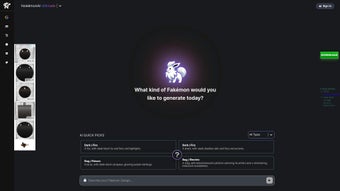
- Visit the homepage – the landing page presents a clean “Generate” button and a sidebar with type and color selectors.
- Select creature type(s) – choose one primary element and optionally a secondary element from the dropdown menus.
- Pick a color palette – use the color wheel or enter a HEX code for precise control.
- Choose generation mode – single, batch (10/20/50), or “Surprise Me” for random combos.
- Click “Generate” – the AI engine processes your inputs and renders the artwork within 3‑7 seconds.
- Save or favorite – click the heart icon to store the image in your browser’s cookie cache; you can later view all favorites via the “My Nokémon” tab.
- Export options – right‑click the image to download as PNG, or use the “Share” button to copy a direct link.
Because the platform is cloud‑based, the heavy lifting is performed on remote servers, ensuring fast performance even on lower‑end devices. For users who prefer a more persistent workspace, the site offers an optional “Create Account” feature that syncs saved creations across devices via secure OAuth (Google or GitHub). This optional step is completely separate from the cookie‑based save system and does not affect the free nature of the tool. Additionally, the UI includes a tooltip‑help overlay that explains each type’s lore inspiration, making the experience educational for younger fans.
Tips for power users: experiment with unconventional type pairings (e.g., “Ghost + Steel”) to discover truly unexpected designs, and use the batch mode to generate a whole ecosystem of creatures that share a thematic color scheme. If you encounter a slow render, check your internet latency or try a different browser; the service is optimized for Chrome and Edge but works well on Firefox as well. Should you run into any glitches, the “Help” button opens a live chat with the support team, and a comprehensive knowledge base is available under the “Resources” menu.
Pros, Cons, FAQ & Final Verdict
Pros and Cons – A Balanced Look
- Pros:
- Completely free and instantly accessible from any device.
- High‑quality AI artwork generated in seconds.
- Batch mode accelerates bulk creation for game designers.
- No registration required for basic use.
- Responsive design ensures smooth operation on mobile.
- Original content avoids copyright issues.
- Regular updates keep the AI model fresh.
- Secure HTTPS connection and encrypted cookies protect user data.
- Optional account sync for cross‑device saving.
- Community‑driven roadmap with transparent changelog.
- Cons:
- Requires an internet connection; offline use is not possible.
- Generated images are limited to the AI’s style; no full artistic control.
- Cookie‑based saving can be lost if you clear browser data.
- Marketplace integration is still in beta and may have limited features.
- Advanced users may miss fine‑tuned parameter sliders (e.g., prompt weighting).
- Occasional server load spikes can increase render time.
Frequently Asked Questions
Is AI Pokemon Generator really free?
Yes, the core generator and batch mode are completely free. Donations are optional and help fund server costs and future updates.
Can I use the generated images for commercial projects?
The AI‑created artwork is original, so you may use it commercially, provided you comply with the site’s terms of service and give appropriate credit if required.
Do I need a powerful computer to run the generator?
No. All processing happens on the cloud. A modern browser and a stable internet connection are sufficient.
How are my saved creations stored?
Favorites are saved locally via encrypted cookies. If you clear your browser data, they will be lost unless you create an optional account to sync them.
Is there a mobile app for AI Pokemon Generator?
Currently the service is web‑only, but the responsive design works smoothly on Android and iOS browsers. A native app may be considered in future updates.
What privacy measures are in place for my data?
The site uses HTTPS encryption for all traffic, stores favorites in encrypted cookies, and never logs personal identifiers unless you create an optional OAuth account. You can delete all saved data by clearing your browser cookies.
Conclusion – Why You Should Try AI Pokemon Generator Today
AI Pokemon Generator delivers a delightful blend of creativity and technology. Its instant AI rendering, batch creation mode, and zero‑cost entry point make it an excellent tool for hobbyists, educators, and indie developers alike. While it lacks offline capability and deep artistic controls, those limitations are outweighed by its accessibility and regular content updates. If you love imagining new creatures or need a quick visual reference for a story, this web‑app is a must‑try. Jump in, pick a type, set a color, and watch a brand‑new Nokémon appear—your next favorite monster is just a click away.
Ready to unleash your imagination? Visit AI Pokemon Generator now, start generating free Nokémon, and consider supporting the project with a donation if you love the results. Happy creating!



.png)



